As the Network grows, you may be concerned that the amount of posted content will become overwhelming to you. This is contrary to the purpose of this social platform which is supposed to make information sharing/gathering easier and your work and interactions more efficient. So with this upgrade we are introducing functionality to help you manage this information.
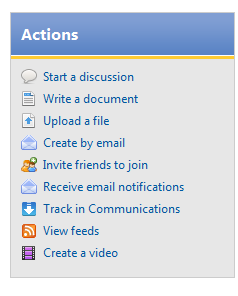
In many of the places on the Network, you will see different choices of things to do: Track in Communications, Follow, or Receive Email notifications. Let me explain the difference and how you might use them to see the content that most interests you.
Follow
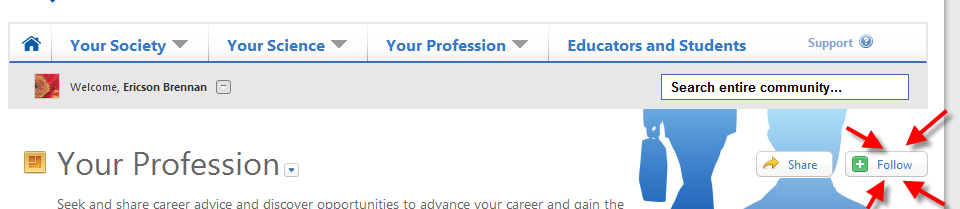
On many pages, you will see a green "Follow" button. Think about following as keeping up with the activity around that group, forum, or discussion. You follow these items because you are interested in them and want to monitor activity around them. Users in your friend lists are automatically included in people you follow. (Don't forget to click on the images to view them larger.)
New activity of your followed content will appear in your What Matters: Activity stream which is accessed via the first button of the top bar. When there is new activity, icon turns yellow and a number may appear next to it, indicating how many new items you have.

Track in Communications
When you select Track in Communications, activity for this group or forum or person, will appear in your What Matters: Communications stream which can be accessed through the second button at the top.

In addition, any updates or comments on content you create or collaborate on, direct messages, mentions, shares, and announcements automatically appear in your communications until you choose to stop tracking them.
Email Notifications
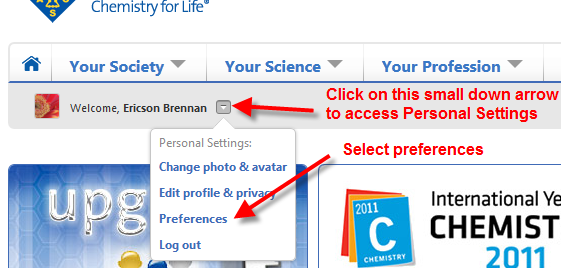
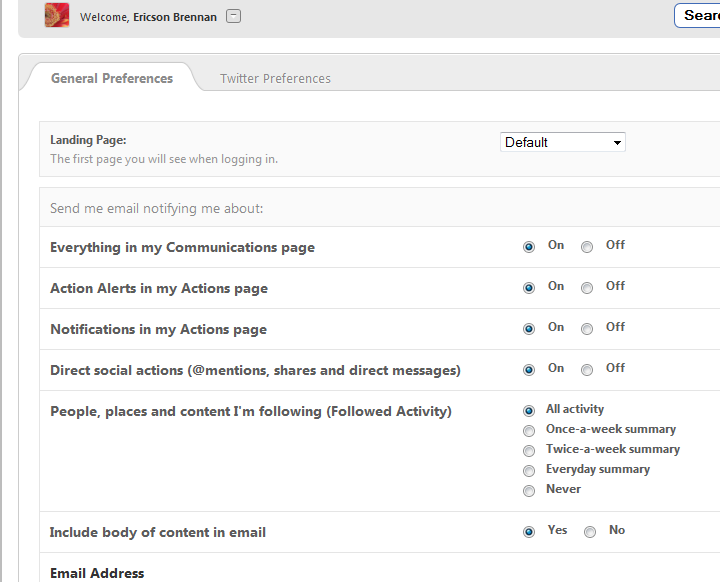
The default setting is that all things you are following or tracking automatically sends you an email. You may want to change that in Your Preferences.
Select the types of default notifications you would like to receive.
You can, as always, override your preferences and email notifications for individual groups, content, or people through the link in the Actions Box.
As always, if you have any comments or questions, post them below and we'll answer them as soon as we can.
Cheers!